



If your Poshmark closet has slowly turned into a digital junk drawer — stale listings buried under new ones, mismatched photos, and items you’re not even sure you still own — you’re not alone.
The good news? 2026 is the perfect year to fix it.
Poshmark rolled out a major app redesign this spring, complete with larger 3:4 portrait photos, a better Seller Tools hub, and a new Inactive Listings feature that actively rewards active Posh closets in search results.
In other words, Poshmark closet organization is no longer just about aesthetics. It directly affects your visibility, your sell-through rate, and your bottom line.
Here’s a complete, step-by-step guide on how to organize your Poshmark closet in 2026 and how automation tools like Poshmark Pro Tools can handle the repetitive parts for you.
Why Posh Closet Organization Matters More Than Ever in 2026
Poshmark’s redesigned app puts sellers’ closets front and center with a cleaner, more visual layout. Shoppers now browse larger portrait images, personalized closet feeds, and trend-driven discovery pages. That’s great news for organized sellers — and bad news for cluttered ones.
Two changes make organization especially important this year:
1. Active Listings Get Priority
Poshmark’s new Inactive Listings tool flags items that haven’t seen qualifying activity (editing, offers, bundling, or comments) in 60 days. Active listings are prioritized in search and browsing, so a neglected closet literally sinks in visibility.
2. Buyers See Your Closet as a Storefront.
With the new closet layout and personalized browsing, first impressions matter. A posher who lands on your closet from a single listing decides within seconds whether to keep scrolling. Cohesive photos, logical ordering, and fresh inventory keep them there.
How to Organize Your Poshmark Closet?
Step 1: Audit What You Actually Have
Before rearranging anything, take inventory. Open your closet and go listing by listing, sorting everything into four buckets:
- Active and accurate — items you still have, photographed well, priced right.
- Needs a refresh — items with old square photos, weak titles, or outdated prices.
- Stale — listings older than 60–90 days with no likes, shares, or offers.
- Gone or unsellable — items you’ve sold elsewhere, donated, or can’t locate.
Delete or mark unavailable anything in bucket four immediately. Nothing damages your seller reputation faster than canceling an order because you can’t find the item — especially now that Poshmark restricts accounts that cancel more than 3% of orders in a rolling 90-day period.
Step 2: Match Your Physical Storage to Your Digital Closet

Digital organization collapses without physical organization behind it. The gold standard for 2026 remains the bin-and-SKU system:
- Assign every item a location code (e.g., B3-014 for Bin 3, item 14) and add it to the end of the listing title or in a private note.
- Store items in clear, labeled bins sorted by the same logic you use online — category, size, or listing date.
- Bag delicate items individually in clear poly bags so they stay photo-ready and ship-ready.
When a sale comes in, you should be able to locate, pack, and ship the item in under five minutes. Fast shipping feeds directly into your seller ratings, and Poshmark’s new shipping reminders make slow fulfillment more visible than ever.
Step 3: Refresh Your Photos for the New Portrait Layout
The single biggest visual change in 2026 is the shift to 3:4 portrait imagery in search results and closet views. New Poshmark listings automatically display in the taller format, which gives clothing — especially dresses, coats, and full outfits — dramatically more presence on screen.
To organize your closet visually:
- Reshoot your best sellers first. Prioritize high-value and high-traffic items for new portrait photos rather than reshooting everything at once.
- Pick one consistent cover style. Whether it’s flat lays on a white background or hung shots against a neutral wall, uniform covers make your closet look like a curated boutique instead of a garage sale.
- Lead with the strongest angle. The cover photo does the selling; detail shots (tags, fabric, flaws) belong in slots two through eight.
- Use natural or ring lighting. Larger images magnify blur and bad lighting, so quality matters more now, not less.
A visually consistent closet also performs better with Poshmark’s AI-powered visual search (Posh Lens), which matches shopper photos to listings. Clear, well-lit images give the algorithm more to work with.
Step 4: Structure Your Closet Like a Store
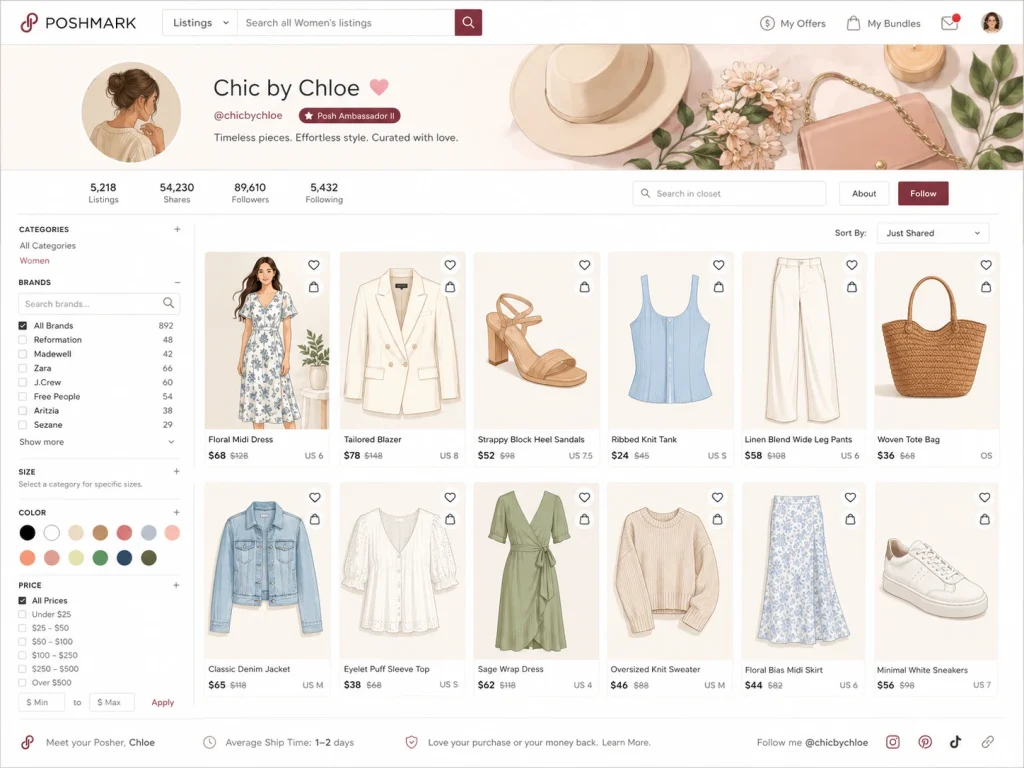
Poshmark displays listings based on when they were created or last shared. That means you control your closet’s layout through strategic sharing. Organize it the way a merchandiser would:
- Top rows = prime real estate. Share your newest arrivals, seasonal items, and best-priced pieces last so they appear first.
- Group by category or theme. Sharing all your denim, then all your dresses, then shoes creates visual “sections” shoppers can scan easily.
- Front-load seasonal inventory. In July, swimwear and summer dresses belong at the top; move sweaters down until fall.
- Bury (don’t delete) slow movers. Older items still get search traffic — they just don’t need premium placement.
Manually re-sharing hundreds of listings in a specific order every day is exactly the kind of repetitive work that burns sellers out.
A Poshmark bot like Poshmark Pro Tools can share your entire closet in your chosen order on a schedule, keeping your layout intentional and your listings fresh in search — even while you sleep.
Poshmark’s own Bulk Sharing feature returned in 2026 as well, so between native tools and third-party automation, there’s no excuse for a stagnant closet.
Step 5: Relist and Revive Stale Inventory
Listings older than 60 days now risk being flagged as inactive, and stale items rarely convert anyway. Build a monthly “revival routine”:
- Identify listings with no activity in 30–60 days.
- Copy the listing, improve it, and delete the original. Rewrite the title with stronger keywords, swap in a portrait cover photo, and adjust the price based on comparable sold listings.
- Relist during peak hours — evenings and weekends typically see the most browsing traffic.
Relisting resets the item as “new,” restoring the algorithmic boost fresh listings receive. It also keeps your closet ahead of the Inactive Listings sweep.
Step 6: Automate Offers and Engagement
Poshmark closet organization isn’t only about how your closet looks — it’s about how it behaves.
In 2026, the minimum buyer offer rose to 40% of listing price, cutting down lowballs, and Smart Sell can now automate negotiations down to your preset floor price. Take advantage:
- Set floor prices on every listing so automated negotiations never dip below your margin.
- Send Offers to Likers consistently. Likes are warm leads; a 10%+ discount with a shipping deal converts a surprising number of them.
- Use Closet Clear Out events to move aging inventory with discounted shipping.
Consistency is the hard part — and again, it’s automatable. Scheduling shares, follows, and offers through Poshmark Pro Tools will keep your Posh closet active around the clock, which is precisely the behavior Poshmark’s algorithm rewards with better search placement.
Step 7: Maintain a Weekly Closet Routine
Organizing Poshmark closet is a habit, not a one-time project. A simple weekly rhythm keeps everything humming:
- Daily (10 minutes): Share your closet top to bottom (or let automation do it), respond to comments, and send offers to new likers.
- Weekly (30 minutes): List new inventory, reshoot one batch of old photos, and review your bin system for accuracy.
- Monthly (1 hour): Run your stale-listing revival, check your Sales Report for top-performing brands and categories, and rebalance pricing.
Your My Sales Report is an underused organizational tool in its own right — it tells you which brands, sizes, and categories actually sell from your closet, so you can organize your sourcing (not just your shelves) around real data.






Poshmark Ban: Reasons & How to Avoid Getting Banned
Getting banned on Poshmark almost feel like a punch to the gut. One day your Posh closet is thriving. The next day, you can’t log

How Much Does Poshmark Take? Poshmark Selling Fees 2026
If you found yourself with a pile of gently-used or brand-new clothing and fashion accessories that deserve a new home, Poshmark is the answer to

How to Organize Your Poshmark Closet in 2026
If your Poshmark closet has slowly turned into a digital junk drawer — stale listings buried under new ones, mismatched photos, and items you’re not