May 14, 2026

Sharing is one of the most common tasks Poshmark sellers repeat every day. It helps bring listings back into view, keeps a closet active, and gives poshers more chances to discover available items.
The problem is that sharing items on Poshmark one by one takes time, especially when your closet has hundreds of products. That is where Poshmark bulk sharing becomes useful.
In this guide, you will learn how to bulk share on Poshmark, why it matters, when to use it, and how sellers can reduce repetitive sharing work with a sharing tool like Poshmark Pro Tools.
What Does Bulk Share Mean on Poshmark?
Bulk sharing on Poshmark means selecting multiple listings and sharing them to your followers in one action instead of opening and sharing every item separately.
This feature is built for Poshmark sellers who want to save time while keeping their closets visible. Rather than tapping through listing after listing, you can choose several items at once and share them together.
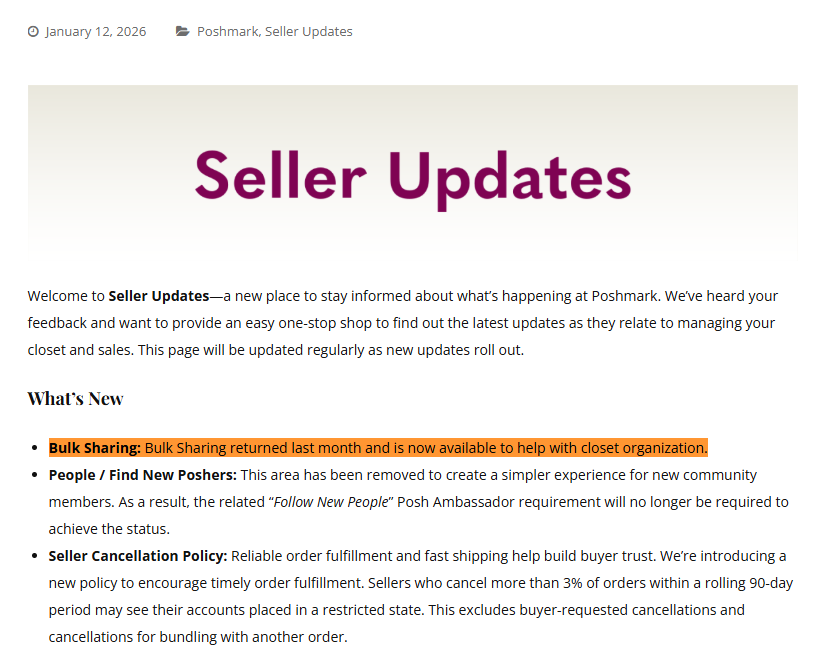
Poshmark confirmed in its January 12, 2026 Seller Updates that Bulk Sharing had returned and was available again for sellers. This matters because many sellers had been waiting for the feature to come back after it disappeared for a period of time.
Bulk sharing is especially helpful when you want to:
- Share a group of listings quickly
- Bring older items back to the top of your closet
- Mass share items before busy shopping hours
- Maintain a more active selling routine
Why Bulk Sharing Matters for Poshmark Sellers?
Poshmark is not just a shopping app. It also works like a social marketplace, where sharing plays a role in visibility and discovery.
Poshmark itself tells sellers to share listings with followers to help shoppers discover their items. Its earlier Bulk Listing Actions announcement also explained that bulk sharing was created to help sellers save time, increase listing visibility, and reach more shoppers.
That does not mean every share leads to an instant sale. But it does mean sharing remains a useful activity for sellers who want to keep their inventory active.
Bulk sharing helps because it makes that routine faster.
Instead of spending extra time clicking listing after listing, you can complete a sharing session in fewer steps and move on to other tasks like pricing, sending offers, or improving product titles.
Does Bulk Sharing Help You Make More Sales?
Bulk sharing can help with visibility, but it should not be treated as a guaranteed sales button.
Sharing puts listings back in front of followers and supports discovery, but sales still depend on other factors, such as:
- Product demand
- Competitive pricing
- Listing photos
- Titles and keywords
- Offers and discounts
- Closet trust and seller responsiveness
Poshmark has repeatedly positioned sharing as part of seller exposure and shopper discovery, but it works best alongside a complete selling strategy rather than by itself.
A better way to think about bulk sharing is this:
It improves efficiency first, and visibility second.
That makes it valuable, especially for sellers who already understand that consistency matters.
How to Bulk Share on Poshmark Manually?
- Open the Poshmark app on your phone and log in to your account.
- Next, tap the profile icon on the bottom right corner of the screen.
- Then, tap “My Closet.”
- Tap the “Tools” icon on the top right corner of the screen.
- Tap “Share to Followers” under the “Bulk Listing Actions” section.
- Select the specific listings that you want to share at once or you can tap “Select All” to bulk share all your Posh listings.
- Lastly, tap “Share to Followers.”
The Limitation of Manual Bulk Sharing
The Poshmark in-app bulk sharing feature is useful, but it is still manual. You still need to:
- Open the app
- Go to Seller Tools
- Choose the bulk share option
- Select listings
- Repeat the process when needed
For new sellers, that may be fine.
For active resellers, however, manual sharing feels repetitive. The more listings you manage, the more time those repeated actions can take over a week or a month.
That is why some sellers look for a way to automate the boring parts of the routine.
How Poshmark Pro Tools Make Bulk Sharing Easier?
Poshmark Pro Tools is built around automating repetitive Poshmark tasks such as self sharing, community sharing, and following.
For a seller interested in bulk sharing, the most important benefit is automated self sharing.
Instead of manually choosing listings again and again, Poshmark Pro Tools help sellers create a more consistent sharing routine with less repetitive work.
Poshmark Pro Tools includes features such as:
- Auto self sharing
- Auto community sharing
- Auto following
- Target following
- Auto Pilot Scheduling
The Ultimate Poshmark Bot Guide gives a deeper explanation of how automation tools are used to handle repeated Poshmark actions.
For readers who are new to the software, the Poshmark Pro Tools Getting Started guide walks through setup steps such as downloading the app, activating it, logging into a closet, and starting closet sharing.
Best Practices for Bulk Sharing on Poshmark
Share Intentionally
Do not treat sharing like a random button press. Choose groups of listings that match your current goals, such as seasonal products, newly discounted items, or listings that need more visibility.
Keep Your Listings Worth Clicking
Sharing may increase exposure, but weak photos, unclear titles, and poor pricing can still hold back sales.
Visibility matters more when the listing itself is appealing.
Pair Sharing With Other Selling Actions
Use bulk sharing alongside:
- Relisting slow movers
- Sending offers
- Refreshing descriptions
- Improving listing photos
- Reviewing pricing
This creates a stronger overall selling system.
Build a Routine You Can Maintain
The best sharing schedule is one you can follow consistently. Some sellers prefer a light manual routine, while others use software to cut repetitive work.
That is also why Poshmark Pro Tools highlights automation as a solution for regular Poshmark sellers who want to spend less time repeating the same actions.
Put your closet on schedule
Shares, follows, offers and relists run from the cloud - $6.99 per closet, per month.
Get Started