

Getting banned on Poshmark almost feel like a punch to the gut. One day your Posh closet is thriving. The next day, you can’t log in.
For new sellers, a ban is frustrating. For full-time resellers, it can wipe out a real source of income overnight.
The good news? Most Poshmark bans are avoidable.
In this guide, we’ll break down why Poshmark bans accounts, the warning signs to watch for, and the exact steps you can take to keep your closet safe.
What Is a Poshmark Ban?
A Poshmark ban happens when Poshmark restricts or permanently removes your access to your account. It usually means you violated the Poshmark’s Terms of Service or Community Guidelines.
Bans come in different forms. Understanding each type will help you respond the right way.
Temporary suspension. Poshmark locks your account for a set period or until you fix a problem. You may need to verify your identity or remove a listing.
Shadow ban (soft block). Your Poshmark account works, but your listings stop showing up in search results. Sales suddenly dry up, and shares seem to go nowhere.
Permanent ban. Poshmark deletes or permanently disables your account. In most cases, you cannot open a new one, because Poshmark tracks devices and payment details.
Reasons Poshmark Bans Accounts
Poshmark doesn’t ban sellers at random. Almost every ban traces back to one of the violations below.
1. Selling Counterfeit or Replica Items
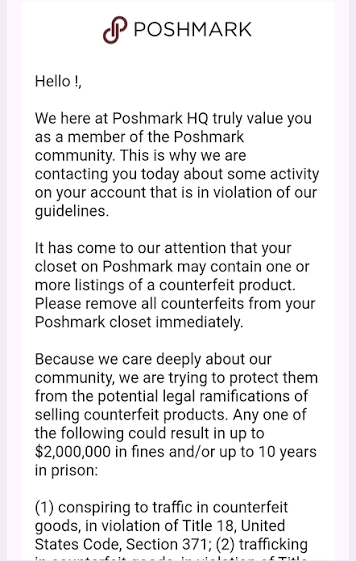
This is the fastest way to lose your Poshmark account. Poshmark has a zero-tolerance policy for fakes.
Listing a “designer-inspired” bag as authentic, or selling replicas of brands like Louis Vuitton, Gucci, or Nike, puts your closet at serious risk. Even one confirmed counterfeit sale can lead to a permanent ban.
If you’re unsure whether an item is authentic, don’t list it. It’s not worth losing your entire Poshmark closet over one sale.
2. Completing Transactions Off the Platform
Poshmark earns its revenue from fees on each sale. So it strictly forbids off-platform deals.
Sharing your phone number, email, PayPal, Venmo, or Cash App details in listings or comments is a major red flag. Poshmark’s system scans messages for this, and buyers can report you too.
Even hinting at it — like “message me elsewhere for a better price” — can trigger a review of your Posh account.
3. Selling Prohibited Items
Poshmark allows fashion, accessories, select home goods, pet items, and some electronics. Everything else is off-limits.
Banned categories include used underwear, used makeup, health and wellness products, perfume (in some cases), food, medical devices, and anything illegal or recalled. Listing these items repeatedly can get your account flagged and removed.
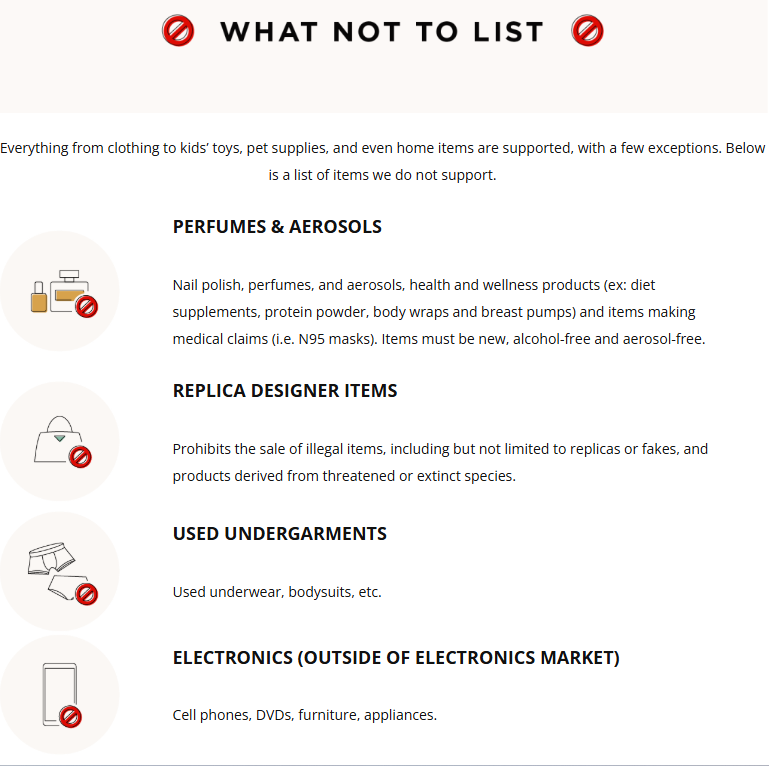
Before you list something unusual, check Poshmark’s prohibited items list. Two minutes of reading can save your account.
4. Aggressive or Bot-Like Sharing Behavior
Sharing is the heartbeat of Poshmark. But sharing too fast, too often, looks robotic to Poshmark’s detection systems.
If your account shares thousands of listings in minutes, follows hundreds of users per hour, or runs 24/7 without breaks, Poshmark may flag it for automation abuse. That often leads to a “share jail” (temporary block) or worse.
This is where smart, human-like activity matters — and we’ll cover how to manage that safely later in this post.
5. Harassment and Poor Community Behavior
Poshmark is a social marketplace. Rude comments, bullying, spamming other closets, or fighting with buyers in public comments all violate community guidelines.
Repeated reports from other users add up. Poshmark reviews reported accounts, and a pattern of bad behavior can end in suspension.
Stay professional, even with difficult buyers. Kill them with kindness — your account depends on it.
6. Misleading Listings and Poor Selling Practices
Honesty protects your account. Deceptive listings destroy it.
Common violations include using stock photos as your own, hiding flaws or damage, listing items you don’t have in hand (drop-shipping unlisted inventory), and wildly inaccurate descriptions. Each unhappy buyer who opens a case creates a mark against your account.
Too many cases, cancellations, or unshipped orders signal to Poshmark that you’re an unreliable seller.
7. Operating Multiple Poshmark Accounts
Poshmark’s terms allow one account per person. Running several Posh closets from the same device, IP address, or payment method can look like manipulation.
Some Poshmark sellers create extra accounts to self-share, leave fake reviews, or dodge a previous suspension. Poshmark’s systems connect the dots quickly, and all linked accounts can go down together.
8. Payment and Identity Issues
Chargebacks, disputed payments, mismatched identity details, or suspicious login activity can also freeze your Poshmark account. Poshmark takes fraud prevention seriously to protect both buyers and sellers.
Keep your payment info current and accurate. If Poshmark asks you to verify your identity, respond quickly.
Warning Signs Your Poshmark Account May Be at Risk
A ban rarely comes out of nowhere. Poshmark usually sends signals first.
Watch for these early warnings:
- Removed listings. Poshmark deletes a listing and emails you about a violation.
- Share blocks. You get a message saying you’ve shared too much and must wait.
- Captcha challenges. Frequent “prove you’re human” prompts suggest Poshmark suspects automation.
- Sudden drop in visibility. Your shares stop generating followers, likes, or sales — a possible shadow ban.
- Warning emails. Any message from Poshmark about guideline violations deserves your full attention.
If you notice any of these, slow down and clean up your closet immediately. Treat every warning as your last one.
How to Avoid Getting Banned on Poshmark?
Sell Only Authentic, Allowed Items
Source inventory from trustworthy places. Learn basic authentication for the brands you sell, and keep receipts when possible.
When in doubt about a category, search Poshmark’s official prohibited items list before listing. If it’s borderline, skip it.
Keep Every Transaction on Poshmark
Never share personal contact or payment details, no matter how tempting the offer. If a buyer pushes for an off-platform deal, decline politely and report them.
Staying on-platform also protects you. Poshmark’s buyer and seller protections only apply to transactions completed through the app.
Write Honest, Detailed Listings
Use your own clear photos from multiple angles. Describe flaws openly, list accurate measurements, and price fairly.
Honest listings reduce returns, cases, and complaints — the exact metrics Poshmark watches when evaluating sellers.
Ship Fast and Communicate Well
Ship within one to two business days whenever possible. If a delay happens, message the buyer right away.
Fast shipping and friendly communication earn great ratings. Great ratings build a track record that protects you if a dispute ever arises.
Share and Follow at a Human Pace
Consistency beats intensity. Sharing your closet a few times a day at a natural pace is far safer than blasting thousands of shares in one burst.
Take breaks. Vary your activity. Avoid patterns that look mechanical, like sharing at the exact same second every minute, all night long.
Stick to One Poshmark Account
One person, one closet. If a family member wants to sell too, they should create their own account with their own device, email, and payment details.
Never open a second account to escape a suspension. It almost always leads to a permanent ban on both.
Respond to Poshmark Fast
If Poshmark emails you about a listing or asks for identity verification, act fast. Ignoring official requests makes small problems grow into account-ending ones.
Using Automation Safely on Poshmark
Let’s address the elephant in the room. Many serious Poshmark sellers use automation tools to save time on sharing, following, and relisting.
Automation itself isn’t the problem — reckless automation is. Poshmark accounts get flagged when automation tools behave in obviously robotic ways: impossible speeds, nonstop activity, and zero variation.

If you choose to automate, choose wisely. A quality automation tool like Poshmark Pro Tools is designed with safety in mind, using human-like sharing speeds, randomized delays, and built-in activity limits that mirror natural selling behavior.
Here’s how to automate responsibly:
- Set conservative limits. Stay well below aggressive share and follow volumes, especially on newer accounts.
- Use randomized timing. Poshmark Pro Tools spaces out actions with natural pauses, so your activity doesn’t look scripted.
- Schedule rest periods. Real sellers sleep. Your account activity should too.
- Ramp up slowly. Warm up new accounts with light activity before increasing volume.
- Stay hands-on. Automation should support your selling, not replace your judgment. Keep listing, photographing, and communicating personally.
What to Do If You Get Banned on Poshmark?
Even careful sellers sometimes face suspensions. If it happens to you, don’t panic — and don’t create a new Poshmark account.
Step 1: Read the notification carefully. Poshmark usually explains the reason by email. Identify the exact violation before responding.
Step 2: Contact Poshmark Support. Reply to the email or submit a request through the Support Center. Stay calm, polite, and factual.
Step 3: Explain and provide evidence. If it’s a misunderstanding, say so clearly. Share receipts, photos, or context that supports your case.
Step 4: Acknowledge honest mistakes. If you did break a rule unknowingly, admit it, explain what you’ve learned, and describe how you’ll comply going forward. Accountability improves your odds.
Step 5: Follow up patiently. Appeals can take days or weeks. Send polite follow-ups, but avoid spamming support with duplicate tickets.
Temporary suspensions and first-time issues usually get resolved in hours. Permanent bans for counterfeits or fraud rarely do — which is exactly why prevention matters so much.


Poshmark Ban: Reasons & How to Avoid Getting Banned
Getting banned on Poshmark almost feel like a punch to the gut. One day your Posh closet is thriving. The next day, you can’t log

How Much Does Poshmark Take? Poshmark Selling Fees 2026
If you found yourself with a pile of gently-used or brand-new clothing and fashion accessories that deserve a new home, Poshmark is the answer to
How to Organize Your Poshmark Closet in 2026
If your Poshmark closet has slowly turned into a digital junk drawer — stale listings buried under new ones, mismatched photos, and items you’re not